Rhythm Music - Offline Player
- 3.8
- Rating
- 10.00M
- Installs
- Free
- Price

 Analysis by App-foxy
I spent time with Rhythm Music - Offline Player as a straightforward way to listen to music without depending on a continuous connection. It is a free Music & Audio app from Photos & Videos Download Tools, aimed at people who want playback available during travel, exercise, or other moments when staying online is inconvenient. My overall impression is practical rather than flashy: its value depends less on discovery features and more on how comfortably it fits into an existing collection of music.
The app is rated 3.8 on average from around 3,300 ratings, and it has passed five million installs. Those figures suggest that it has found an audience, although they do not automatically make it the right player for everyone. I would look at it as a utility for local listening, especially if I already have audio stored on my phone and want a simple way to play it. People expecting a full streaming service, social recommendations, or a carefully curated music ecosystem should approach it with different expectations.
How the listening experience feels in everyday use
I find that the everyday appeal of an offline player depends on more than whether a song starts: it also depends on how much preparation I’m willing to repeat and whether my listening habits stay predictable. I’d judge this app by how smoothly it fits into a routine after the initial setup, then consider which small maintenance habits keep that routine convenient rather than turning it into another chore.
You May Also Like

 Blood Strike: 2.5 Anniversary
Blood Strike’s Loadouts Turn Every Drop Into a Tactical Gamble
A close look at Blood Strike’s custom loadouts: how fast access to signature weapons reshapes its battle royale rhythm, rewards preparation, and narrows the gap between fights.

 Pandora - Music & Podcasts
Pandora’s Music Is Easy to Start, but Harder to Recover
Pandora’s strength is its low-effort path from a seed to a station. Its weak spot is how much confidence it asks you to place in connection, setup, and quiet recovery.

 8 Ball Pool
 Is Built on Rivalries, Rematches, and Routine
A close look at the rivalries, rematches, shared routines, and unanswered safety questions that turn a quick pool match into a persistent mobile community.

 Samsung Music
’s Quiet Strength Is Playing What You Already Own
Its reach comes less from spectacle than from dependable access to a personal library. That simplicity is both the app’s strongest retention engine and its ceiling.

 AccuWeather: Weather Radar
AccuWeather Review: A Quick, Clear Forecast for Everyday Decisions
For everyday plans, the best forecast is the one you can understand quickly. AccuWeather makes rain timing, radar, and local conditions easy to act on, with a few trade-offs.

 Hill Climb Racing
Why Hill Climb Racing Still Turns Crashes Into One More Run
A tiny car, a bumpy hill and one more upgrade: Hill Climb Racing keeps resurfacing because its simple chaos makes every near-miss feel personal.
More From Our News Desk



Readability and navigation matter more than decoration
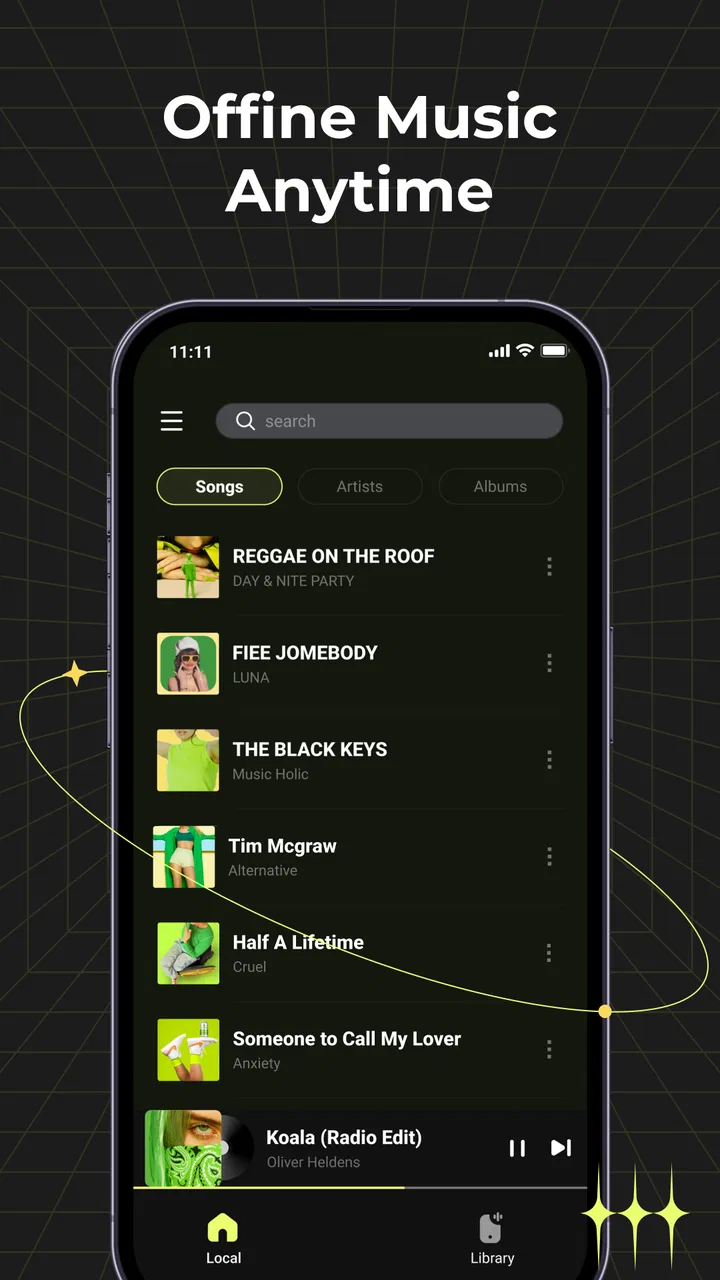
For an offline player, the first test is whether I can get from opening the app to playing a track without having to think too much. That is where Rhythm Music makes the most sense. Its purpose is narrow, and a narrow purpose can be helpful: I am not searching through a large online catalog or waiting for recommendations before listening. I can treat it as a local music shelf rather than a complete music subscription platform.
That simplicity can also make the app easier to approach for someone who dislikes crowded interfaces. A person who mainly wants to choose an album, artist, or saved track may prefer this kind of focused experience over a streaming app filled with banners, suggested playlists, podcasts, and account prompts. In my view, the strongest accessibility advantage here is conceptual clarity. The fewer competing destinations there are, the easier it is to remember where playback controls and personal music are likely to be.
Still, local players are only as readable as the music library they receive. If a collection has inconsistent file names, missing artwork, or poorly organized folders, browsing can become less comfortable. I would prepare the library before relying on the app for a long trip: use recognizable names, remove duplicates, and group music in a way that makes sense without needing to inspect every file. This small step can reduce the amount of visual searching later.
The current version is 1.2.0, and the app works on Android 8.0 or later. That makes it relevant for people using older compatible phones instead of buying a new device just to play local audio. I would nevertheless check the experience on the actual phone before a journey, because screen size, system text settings, storage organization, and manufacturer software can all affect how comfortable navigation feels.
Useful for people who need predictable playback
One of the less obvious strengths of an offline player is predictability. Streaming services are excellent when I want variety, but they also introduce changing recommendations, online dependencies, and a larger number of interface decisions. With Rhythm Music, the useful workflow is more controlled: prepare the music once, then return to the same collection whenever I need it. That can suit listeners who find constantly changing content distracting.
This is particularly practical for a commute through areas with unreliable coverage. I can choose music before leaving, switch to the player during the journey, and avoid making a network connection part of the listening routine. The same approach works for a flight, a rural drive, or a location where mobile data is expensive. The important trade-off is that the app is only as useful as the offline library I have prepared; it does not replace the convenience of a streaming catalog that can supply something new immediately.
I also see a benefit for people who want to separate listening from social features. There is no need to treat music as a feed or respond to recommendations. For some users, that quieter relationship with their own collection is more comfortable. For others, it will feel limited because there is less help finding unfamiliar artists or building a new listening habit.
Motor and sensory considerations during playback
Music control is often used while walking, exercising, cooking, or carrying something, so the amount of precise interaction required matters. My practical advice is to start playback and prepare the queue before the activity begins. That reduces the need to perform small taps while moving and makes the app more suitable for situations where attention or hand control is divided.
This is also where a local player can be more manageable than a streaming application with many destinations. If I already know what I want to hear, I can avoid repeatedly navigating through search results, recommendations, and artist pages. The trade-off is that a simple player may provide less assistance when I need to locate an unfamiliar track inside a badly organized collection. Good file organization is therefore not just tidy housekeeping; it directly affects motor effort and visual scanning.
For listeners sensitive to interruptions, offline playback has a natural advantage because the session is not built around loading new online content. I would still test the app with headphones, a car system, or a small speaker before depending on it in an important setting. Audio comfort varies widely, and a player that feels fine through one output device may be less convenient through another. I would also keep the phone’s system volume at a safe level, especially during long listening sessions.
People with low vision may benefit from increasing the phone’s text size or display contrast where the operating system supports those adjustments, but I would not assume that every screen will scale perfectly. Larger text can improve legibility while also causing labels to wrap or controls to occupy more space. The sensible approach is to test the exact settings I plan to use, then confirm that I can still identify the library and playback controls without guesswork.
For users who rely on spoken feedback or alternative input, the most important question is whether the app’s controls are exposed clearly enough to the device’s accessibility tools. I would test opening the library, selecting a track, pausing, resuming, and changing position before moving my entire listening routine into the app. That is a realistic check because playback often feels accessible until a user needs to perform a less common action.
Situational access: travel, workouts, and quiet routines
The clearest everyday scenario is a long trip. Before leaving, I would make sure the music I want is already stored locally, open the player while I still have time to correct any organization problems, and begin with a familiar album or playlist. During the journey, I would avoid relying on last-minute searching. This workflow is less exciting than discovering music online, but it is much more dependable when reception is poor or the phone needs to stay in a low-distraction state.
Workouts are another reasonable use case, although the app is not automatically a perfect sports companion. I would create a clearly named exercise selection in advance and place the phone where I can reach it safely. The benefit is that playback can continue without a network connection. The limitation is that changing the mood mid-session may take more preparation than it would in a streaming service with instant access to countless mixes.
Offline listening can also be useful in shared or sensitive environments. Someone may want a personal collection for a waiting room, a study session, or a place where connectivity is restricted. A local library avoids the uncertainty of whether a particular track will load at that moment. At the same time, headphones can reduce awareness of surrounding sounds, so I would not use them in traffic or other places where environmental awareness is essential.
There is a quieter accessibility angle here: predictable access can reduce stress. A listener who becomes frustrated by buffering, changing layouts, or too many choices may find a prepared local collection easier to manage. That does not mean the app serves every ability equally, but it does mean its offline focus can remove one common source of friction. The best result comes when the user controls the preparation stage rather than trying to organize everything while already on the move.
Where it differs from streaming services and other local players
Compared with a streaming service, Rhythm Music gives up catalog breadth and gains independence from an active connection. Streaming is better when I want new releases, editorial playlists, lyrics, recommendations, or music I have not already collected. This app is better when I value ownership of the files on my phone, predictable access, and a less crowded listening routine.
Compared with a more advanced local player, the decision depends on how much control I need. A specialist player may be preferable for listeners who care deeply about detailed sorting, complex queue management, audio customization, or a large set of technical playback options. Rhythm Music is more appealing to someone who wants a direct route to personal music without turning playback into a project.
That distinction is important for accessibility. More features can help one user and burden another. A detailed player may offer more ways to adapt a library, yet also require more menus and more precise interaction. A simpler app may reduce cognitive load while offering fewer solutions for unusual collections. I would choose based on the task I actually perform: basic local listening favors Rhythm Music, while specialized audio management may favor a more configurable alternative.
Remaining barriers I would consider before installing
The biggest barrier is the need to have music ready in the first place. An offline player cannot provide the instant catalog access that many people now expect. If I mostly listen to artists I have not saved locally, I would find the experience restrictive. The app is also a weaker choice for someone who wants one service to handle discovery, online playback, recommendations, and library management in one place.
Another barrier is organization. A messy collection can make a supposedly simple player feel difficult, particularly for users who depend on clear labels or who find repeated visual searching tiring. I would not wait until the day of travel to solve this. Preparing a small, clearly named selection is more inclusive than expecting every user to browse a large, inconsistent library under pressure.
Device context can create additional friction. A small screen, gloves, movement, glare, or a phone mounted out of reach can make any music app harder to operate. I would set up playback before driving or exercising, and I would use the phone’s existing accessibility and display settings where helpful. These steps do not add features to the app, but they can make its focused design more usable in real conditions.
I would also be cautious about treating the Everyone content rating as a promise that every interaction will suit every person. It describes the intended age suitability, not the experience of users with different vision, hearing, motor, or cognitive needs. My recommendation is to test the complete path that matters: finding a track, starting it, pausing it, returning to the library, and recovering after the phone has been locked or interrupted.
Who should choose it, and who should skip it
I would recommend Rhythm Music to someone who already keeps music on an Android phone and wants a free, uncomplicated offline listening option. It makes particular sense for travel, workouts prepared in advance, low-connectivity areas, and listeners who prefer a personal collection over a recommendation-driven service. The app’s age rating is Everyone, which also makes it a broadly approachable option for general household use, provided the actual interface works comfortably for the individual listener.
I would skip it if my main priority were discovering new music, following online releases, or switching instantly between a huge range of artists. I would also look elsewhere if I needed highly specialized audio controls or a carefully documented accessibility workflow. In those cases, a streaming platform or a more advanced local player may be a better match, even if it introduces more complexity.
Photos & Videos Download Tools has positioned this app around a focused listening job rather than a broad entertainment ecosystem. That focus is its most useful quality and its clearest limitation. I like it when I know what I want to hear and want the phone to get out of the way. I like it less when I expect the app to help me discover, organize, and manage every part of my music life.
My inclusive verdict after using the offline approach
The real strength is dependable, prepared listening rather than feature depth. Rhythm Music can make music easier to reach in situations where connection, attention, or data use is a concern. Its focused purpose may reduce cognitive clutter, and its offline orientation suits people who want control over when and what they play. Those benefits are meaningful, especially when the library is organized before the moment of use.
My reservation is that accessibility still depends heavily on the phone, the collection, and the user’s preferred method of control. I would test text scaling, spoken feedback, headphones, and the exact playback steps that matter to me. I would also prepare music in advance instead of assuming the app will solve catalog or organization problems automatically.
The app is free, supports Android 8.0 and later, and has reached over five million installs, so it is easy to consider as a low-risk experiment. Released on May 28, 2025, it is still best judged by the specific listening routine I want to build rather than by its download count. For me, it is a sensible recommendation for straightforward offline playback, but not a universal replacement for streaming or specialist music tools.
If I were recommending it to a friend, I would say this: install it when your priority is a calmer, prepared music library that works during travel or exercise. Spend a few minutes organizing the tracks and testing the controls with your preferred display or input settings. If you need discovery, advanced audio management, or guaranteed ease with a particular accessibility setup, compare other options first. That honest distinction is what makes Rhythm Music - Offline Player worth trying without expecting it to do a job it was not designed to handle.
FAQs for Rhythm Music - Offline Player
01What features does Rhythm Music - Offline Player offer?
Rhythm Music - Offline Player provides a comprehensive offline music experience, allowing users to play their favorite tracks without an internet connection. It also includes features like playlist creation, customizable equalizers, and a user-friendly interface. The app supports a wide range of audio formats and offers seamless integration with your existing music library.
02Is Rhythm Music - Offline Player free to use?
Yes, Rhythm Music - Offline Player is free to download and use. However, it may offer in-app purchases or a premium version to access additional features, such as ad-free listening or advanced audio customization tools. Be sure to check the app's pricing details on the download page for more information.
03How do I download music for offline listening in Rhythm Music - Offline Player?
To download music for offline listening, you need to have the tracks already available on your device or transfer them from another source. Rhythm Music - Offline Player does not provide direct music downloads from the app itself. You can, however, easily import your existing music library and enjoy it offline.
04What audio formats are supported by Rhythm Music - Offline Player?
Rhythm Music - Offline Player supports a variety of audio formats, including MP3, AAC, WAV, FLAC, and more. This ensures that you can play most of your music files without needing to convert them. The app's versatility in handling different formats makes it a convenient choice for diverse music collections.
05Can I customize the sound quality in Rhythm Music - Offline Player?
Yes, Rhythm Music - Offline Player comes equipped with a range of sound customization options. You can adjust the equalizer settings to enhance bass, treble, or other audio components to suit your preferences. This feature allows for a tailored listening experience, making each track sound just the way you like it.
Pros
- User-friendly interface
- High-quality sound output
- Customizable playlists
- Wide format support
- No internet needed
Cons
- Limited song library
- No online streaming
- Ads can be intrusive
- Occasional app crashes
- Basic equalizer features

Rhythm Music - Offline Player
Gallery